Designing decision clarity in clinical trial systems
UI/UX design · Adobe Designathon
We redesigned a clinical intelligence workspace for faster, defensible decisions under time pressure. The sprint centered trust, transparent AI signals, and a calmer hierarchy than typical enterprise dashboards. The full flow was built end-to-end in 10 hours with Hongxin Li under rapid critique loops.

Problem discovery
Why do clinical teams keep getting caught off guard?
How often does this even happen?
More often than teams plan for.
75%
of trials require amendments
What does it cost when it does?
Enough to change a trial's budget.
$43M
avg amendment cost per trial
How much of that is preventable?
Nearly half of it, if caught early.
$20M
estimated preventable exposure
Most clinical dashboards can't show any of this early enough to matter. Here's why:
Why do baselines lie?
Poor benchmarking inflates risk signals.
Why do teams guess?
No precedent data to compare cohorts against.
Why trust the AI?
Outputs arrive without lineage or confidence.
Our approach
From problem list to design principles
Problems
- 1No defined target user
- 2Unclear goals per workflow stage
- 3Weak product differentiation
- 4Visual system lacked clinical authority
01
Confidence
Users need certainty from dense data, not more widgets.
02
Clarity over depth
Design for decision clarity and trust over feature count.
03
Right signal, right moment
Surface what matters now; guide the next action.
04
Clinical structure
A disciplined system that reads as serious, not consumer.
"Design for decision clarity and trust, not for more features or more information."
Strategy
How do we build the trust?
01
Competitor analysis
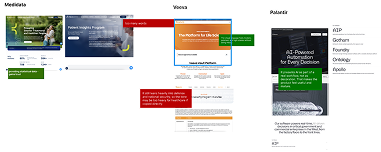
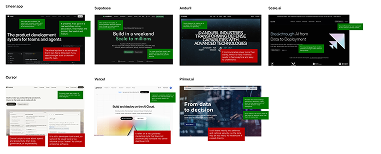
Mapped Medidata, Veeva, Palantir, and product references.
Captured strengths and gaps in a structured pros/cons chart.
02
Key insight
Trusted tools show their reasoning.
Palantir, Cursor, and Supabase never hide the machine.
03
Design principles
Surface AI visibly; never obscure how a value was generated.
Give review and override at every sensitive step.
04
Design direction
Sharper borders and teal for AI-augmented zones.
Layouts modeled on analyst tools, not marketing sites.
Outcome
A shared strategy: build trust through structure, transparency, and control—validated with stakeholder interviews and feedback from current users.
UX research
From scan to synthesis to wires
01
Competitor analysis
Mapped references
02
Adobe Express
Pros / cons chart
03
Wireframes
Clinical patterns
Annotated boards
Two annotated scans—clinical enterprise vs. product-marketing references—were reorganized in Adobe Express into the four-quadrant pros / cons chart.
Reference set
Takeaway: the most trusted products show their reasoning—so we tightened hierarchy, surfaced AI lineage, and borrowed navigation patterns from Linear and Palantir.
Visual system
Color and type
Palette
#3D6469
Altrovia teal
Primary actions
#EAEFF0
Teal light
Nav / hover
#F7F8FA
Surface
Cards
#151819
Dark
Primary text
#5F6672
Mid
Secondary text
#E5E7EA
Border
Dividers
Typography
Display — trial overview
Section header · active module
Button · AI badge · table label
Body copy for dense tables and helper text.
Caption · meta · timestamps
Process
How we built it
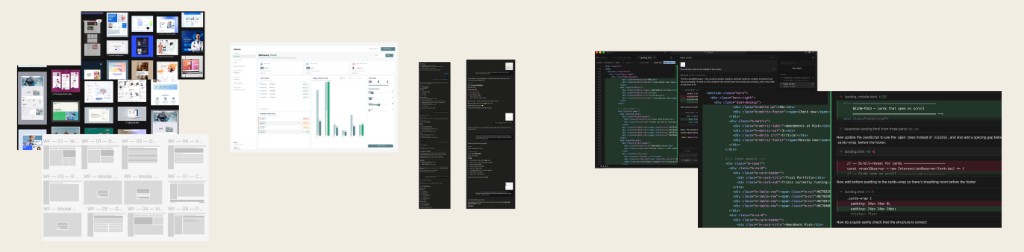
01
Moodboard
Figma02
Dashboard
Figma03
MCP revisions
Figma MCP04
Prototype
Cursor05
AI assist
AIChallenge
UI rules drifted across eight pages.
We cleaned up manually in Figma and Cursor—fast, but not perfectly consistent without a final audit pass.
Design challenges
Where the sprint got hard
01
Understanding real user needs
No direct access to end users.
- Deep pass on the existing product and company context.
- Structured questions to Chris on goals and pain points.
- Used stakeholder input as a proxy for interviews.
02
Maintaining UI consistency
AI speed without precision.
- Ran batches through Cursor to auto-fix drift.
- Still needed manual polish on edge spacing.
- Good enough workflow, not a perfect pipeline.
User feedback
What we heard
Emily Shen
NYU alum · Product designer, Palantir
"Rounded corners feel too sales-y. A serious clinical product needs sharper borders for authority."

Key feedback
- Sharpen corners and grid rhythm.
- Borrow analyst-grade density.
- Reduce decorative chrome.
Christos
Altrovia AI
"The dashboard should read as a portfolio: clients see status and risk at a glance."

Key feedback
- Stronger emphasis on active trials.
- More visual hierarchy than tables alone.
- Client-ready overview first.
Final UI
Eight core screens
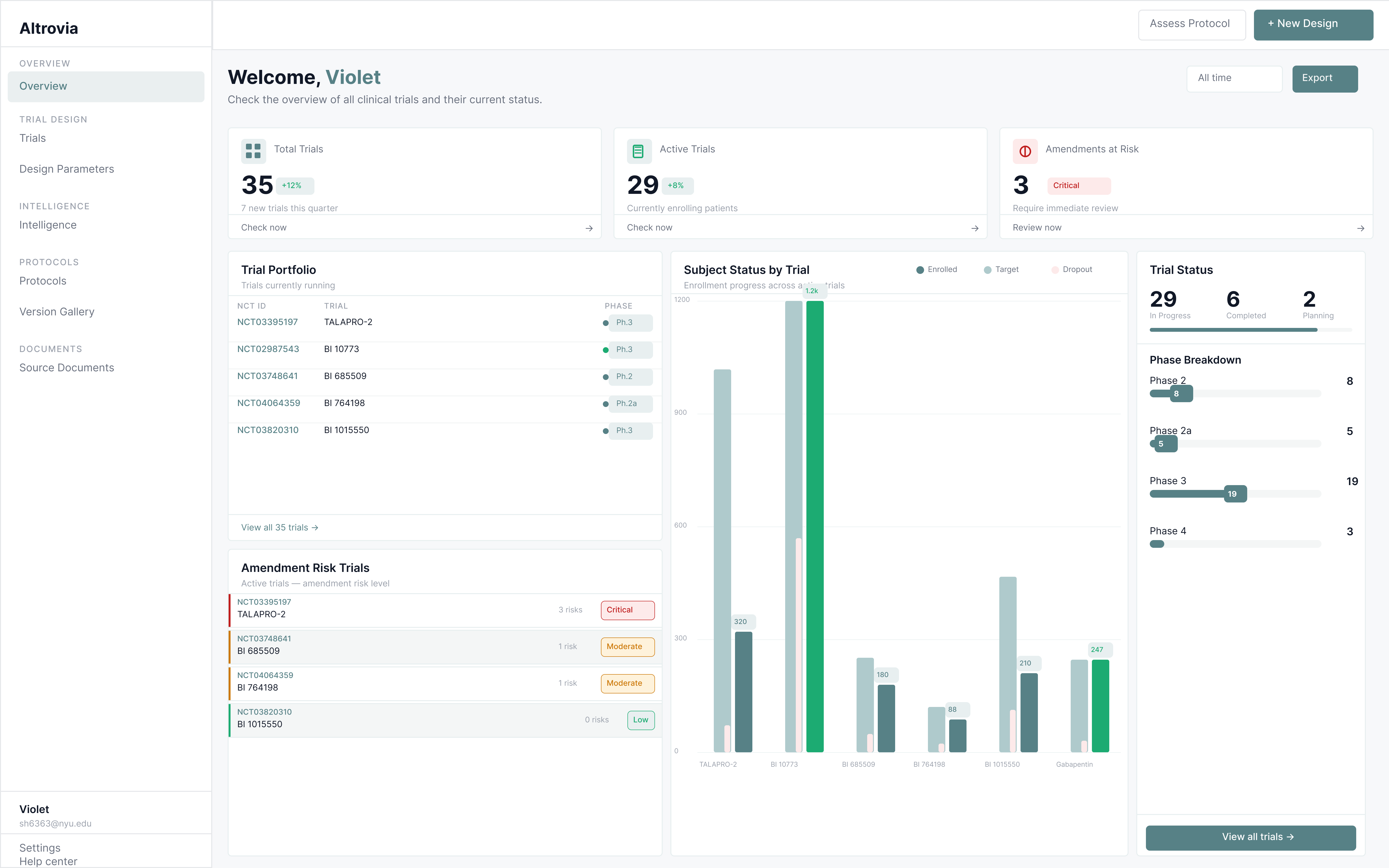
01 · Workspace
Overview · trial cards · new trial CTA
Reflection
What we fixed
We closed the biggest trust and layout gaps first: clearer AI provenance, consistent sidebars, and scanning patterns that felt clinical instead of consumer.
AI trust was invisible
Added extraction badges and source callouts on parameters.
Sidebar overlap
Rebuilt footer alignment across sidebars in one coordinated pass.
Consumer tone
Shifted to sharper borders after Palantir-informed critique.
Hard-to-scan parameters
Collapsible rows with muted label vs. dark value.
Reflection
If we had more time...
Design consistency
Full grid audit for spacing and alignment across every screen.
Landing page
Stronger clinical value story with real marketing visuals.
User testing
Sessions with trial ops to validate AI trust patterns.
Dashboard visuals
More emphasis on active trials and status, beyond tables.
It was also our first time taking a designathon from building wireframes to mockups, and we worked really hard and I am proud that we still brought something we felt good showing. When everything moves this fast, you try to use AI efficiently, not just to skip the hard thinking. I know more tight deadlines will come in real-life work settings, and this felt like good practice for that.
Continue
View all projects